Skip to product information

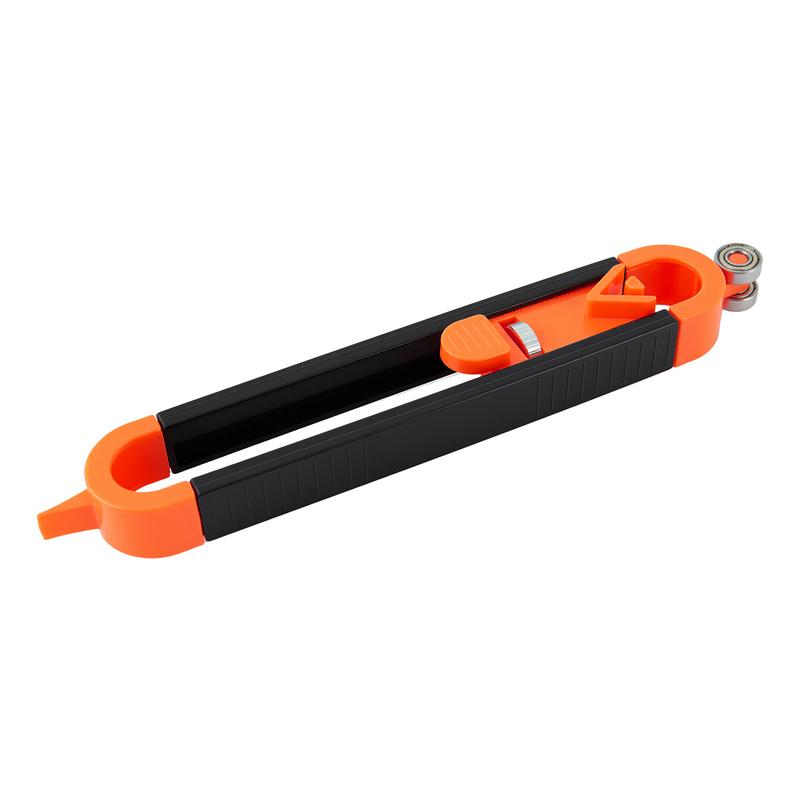
Precision Contour Gauge with Lock

Precision Contour Gauge with Lock

Precise Contour Tracing

Copy Any Curve.
Create a Better Fit.

Trace columns, corners and irregular edges directly onto flooring, tiles or wood. The smooth steel bearing follows the surface while the fixed pencil holder draws the matching contour, helping reduce repeated measuring, trial cutting and wasted material.

360° Smooth Steel Bearing

Glides smoothly along curved, rounded and uneven surfaces for stable, continuous contour tracing.

Adjustable up to 5.91 Inches

Move the pencil holder left or right to match different material widths and marking distances.

Stable Centered Pen Holder

Holds the pencil firmly in place to reduce movement and help keep the traced line consistent.

Fine 0.0394-Inch Pointer

Reaches closer to narrow corners, wall edges and detailed curves for more refined marking.

Works on Multiple Materials

Ideal for laminate flooring, wood planks, tiles, carpets, ceramics and DIY woodworking projects.

Less Measuring and Trial Cutting

Create a direct cutting guide without repeatedly measuring, reshaping or making disposable cardboard templates.


BUNDLE & SAVE

Regular price $240.00
Regular price $240.00 Sale price
SAVE Sold out
Pay with
 
Precision Contour Gauge with Lock
Regular price $240.00
Regular price $240.00 Sale price
SAVE Sold out
View full details

    Precision contour tracing

    Trace Once.
    Cut with Confidence.

    Copy curves, corners and irregular edges directly onto flooring, tile, carpet or wood. Create a clearer cutting guide without relying on repeated measuring and guesswork.

    Less repeated measuring, fewer temporary templates and a clearer outline before cutting.

    Contour forming tool for copying curves and irregular edges
    360° Smooth steel bearing
    5.91 in Adjustable tracing reach
    0.0394 in Fine pointer thickness
    No Power Fully manual operation

    A simpler way to trace

    Stop Guessing Around Curves and Corners

    Follow the actual profile of an object and transfer its shape directly onto your material.

    Traditional method

    More Measuring. More Trial Cutting.

    • Repeatedly measure several reference points
    • Build temporary paper or cardboard templates
    • Estimate difficult curves and rounded edges
    • Trim the material several times to improve the fit
    Contour forming tool

    Follow the Edge. Transfer the Shape.

    • Roll directly along the original surface
    • Draw the contour while the tool is moving
    • Adjust the tracing distance for different projects
    • Create a clear reference line before cutting
    Stable centered pencil holder tracing around a curved object

    More stable marking

    Stable Pen Position, Cleaner Lines

    The centered holder keeps the pencil fixed while the bearing moves along the edge, helping reduce unwanted movement and inconsistent marking.

    • Keeps the pencil in a centered position
    • Helps reduce line wobble while tracing
    • Produces an outline that is easier to follow
    Fine pointer tip for narrow corners

    Detailed contour tracing

    Fine Tip Reaches Tighter Corners

    The slim pointer reaches closer to walls, narrow spaces and detailed profiles, helping capture areas that thicker guides may overlook.

    0.0394 in Approximate fine pointer thickness for more detailed tracing.
    • Useful around trims, columns and detailed profiles
    • Captures smaller changes in the original shape
    360 degree smooth steel wheel bearing

    Smooth edge following

    360° Smooth Steel Bearing

    The metal bearing rolls along rounded and uneven surfaces rather than dragging across them, helping the tool remain in contact with the original edge.

    • Smooth movement around curved surfaces
    • Wear-resistant metal bearing construction
    • Reduces dragging and interruption while tracing

    Built for practical projects

    A Clearer Guide Before You Make the Cut

    01

    Trace While You Move

    Follow the original edge and transfer the profile in one continuous action.

    02

    Adjustable Marking Distance

    Move the holder left or right to match different tracing distances.

    03

    No Disposable Template Required

    Transfer the profile directly instead of repeatedly making temporary patterns.

    04

    No Batteries or Charging

    A fully manual tool that is ready to use whenever you need it.

    05

    Lightweight ABS Body

    Easy to hold, position and carry between household projects.

    06

    Beginner-Friendly Operation

    Straightforward adjustment makes the process easy to understand.

    Why change the way you trace

    Traditional Measuring vs. Direct Contour Tracing

    Project step
    Traditional method
    Contour tool
    Capture irregular shapes
    Estimate several measurements
    Follow the actual edge
    Transfer the profile
    Recreate the shape manually
    Draw while tracing
    Adjust the offset
    Measure and recalculate
    Slide the pencil holder
    Power required
    Depends on the tools used
    No power required
    Simple steps for using the contour forming tool

    Simple setup

    Start Tracing in a Few Simple Steps

    Secure the pencil, set the required distance and guide the bearing along the original shape. The pencil transfers the contour as the tool moves.

    • Loosen the center holder
    • Insert and secure the pencil
    • Adjust the required tracing distance
    • Roll along the edge to transfer the outline
    1

    Loosen

    Release the center holder before inserting the pencil.

    2

    Insert

    Place a suitable pencil or compatible marker into the holder.

    3

    Adjust

    Move the holder to match the required tracing distance.

    4

    Trace

    Keep the bearing against the edge and move at a steady speed.

    Applications for flooring carpet ceramic and tile

    One tool, multiple projects

    Works Across Common Renovation Materials

    Create cutting and placement guides for flooring, carpet, ceramic, tile, trims and other compatible materials.

    • Wood and laminate flooring
    • Carpet and flexible floor coverings
    • Ceramic and tile installation
    • Baseboards, trims and DIY woodworking
    Adjustable contour tool with 5.91 inch movement range

    Flexible positioning

    Adjustable Reach up to 5.91 Inches

    Slide the pencil holder left or right to change the distance between the original edge and the transferred outline.

    5.91 in Approximate maximum adjustable movement distance.
    • Adapts to narrow or wider tracing offsets
    • Holder can be moved toward either end

    Product specifications

    Compact, Adjustable and Easy to Carry

    A lightweight manual tool designed for contour marking during flooring, tile and DIY installation projects.

    Contour forming tool product details
    Product name
    Contour Forming Tool
    Main material
    ABS plastic with metal bearing
    Approx. total length
    9.06 in / approximately 23 cm
    Approx. width
    1.42 in / approximately 3.6 cm
    Adjustable reach
    Up to 5.91 in / approximately 15 cm
    Pointer thickness
    Approximately 0.0394 in / 1 mm
    Power source
    Manual operation, no batteries required
    Recommended uses
    Flooring, tile, carpet, ceramic, trims and woodworking

    Measurements are taken manually and may vary slightly. Please refer to the actual product for final dimensions.

    A Practical Choice for Renovation and DIY Projects

    Designed for users who need to transfer irregular shapes before cutting or positioning materials.

    Home renovation and flooring projects
    Tile and ceramic installation work
    Woodworking and workshop marking
    Baseboard and trim fitting
    Carpet and flexible material cutting
    Beginners and experienced DIY users

    Frequently asked questions

    Everything to Know Before Using It

    Does this tool cut the material?
    No. It is a tracing and marking tool. It creates a reference line on the material, which must then be cut using an appropriate cutting tool.
    Is it suitable for beginners?
    Yes. Insert a suitable pencil, adjust the tracing distance, secure the holder and roll the bearing along the original edge.
    What materials can it be used with?
    It can help create guides for wood flooring, laminate, carpet, ceramic, tile, baseboards, trims and compatible woodworking materials.
    Does it require batteries or charging?
    No. The tool is completely manual and does not require batteries, charging or electricity.
    What type of pencil should I use?
    Use a pencil or compatible marking tool that fits securely inside the holder. Confirm that the tip reaches the material before tracing.
    How can I improve tracing accuracy?
    Keep the bearing in continuous contact with the original edge, move at a steady speed and avoid changing the angle while tracing. Testing on scrap material first is recommended.
    Are the listed measurements exact?
    Measurements are approximate and may have small variations because they are manually measured. Please use the actual product as the final reference.

    Better lines. Better-fitting results.

    A Better Fit Starts with a Better Outline.

    Follow the original edge, transfer the contour and create a clearer cutting guide without relying on guesswork alone.